FINE PRINT
01 / Summaries / One lease, one page
FINE PRINT
A five-year office lease, read and summarised before the director signs.
See every documentLocal AI installation for Australian offices
Custom PCs, multi-GPU servers and compact machines, with local language models for writing, reading, search, meetings and more. Built, installed and ready for your team’s work.
Written on our local machines.
Replayed, not live.
From one desk to a whole office: custom PCs, multi-GPU servers and mini PCs, with local language models installed around the work you do. Four workflows get your team started.
Selected demonstrations / Five office tasks
Leases, call notes, policies, meetings and letters. Five fictional document sets made to explore what a local office setup can do.
A five-year office lease, read and summarised before the director signs.
See every documentA bookkeeper’s call notes become a client letter, an email, a file note and a text.
See every documentAn office manual, indexed on the machine. Ask in plain words; the answer names its policy.
See every questionA builder’s site meeting, transcribed and minuted without leaving the building.
See every documentAn insurer’s claim decision, explained in two minutes, with a reply asking for a review.
See every documentNext Token fictional demonstrations — not client documents. Source documents written for the demonstrations; every output generated on our own machines and checked by a person. Swipe, scroll sideways or choose a dot.
Who it’s for
The teams we set up local AI for, and the work each setup takes on. Every card opens a demonstration: fictional documents, worked on our own machines and checked by hand.
 Generated image · tap for the draft
Client letters, file notes and lodgement reminders.
See the demonstration Generated image · tap for the draft
Lease summaries, key dates and tenant questions.
See the demonstration Generated image · tap for the draft
Site meeting minutes, variations and action lists.
See the demonstration Generated image · tap for the draft
Insurer and supplier letters, explained and answered.
See the demonstration Generated image · tap for the draft
Policy questions answered from your own documents.
See the demonstration Generated image · tap for the draft
First-pass contract summaries and questions to raise.
See the demonstration Generated image · tap for the draft
Replies drafted from your own policies and past answers.
See the demonstration Generated image · tap for the draft
Code help, scripts and spreadsheet formulas, kept off the cloud.
See the demonstration Generated image · tap for the draft
Proposals and reports read, compared and cited.
See the demonstrationLong documents cut to what matters, with clause numbers.
See the demonstrationLetters, emails, file notes and texts from your notes.
See the demonstrationPlain-word questions, answered with the policy named.
See the demonstrationTranscripts, minutes and actions from a recording.
See the demonstrationDense letters explained, and replies drafted.
See the demonstrationInvoices, receipts and forms read into structured data.
See the demonstrationDrafts that follow your tone, your policies and your prices.
See the demonstrationLetters, notices and forms in the languages your customers read.
See the demonstrationScripts, formulas and fixes, tested before they are used.
See the demonstrationEmail read, sorted, routed and filed, as data a job can act on.
See the demonstrationA scan, a photo and a handwritten form.
PAPER TRAIL is an original Next Token demonstration. A scanned tax invoice, a phone photo of a till receipt and a handwritten expense claim, read by the same local model through its own vision encoder and turned into structured data a bookkeeping system can import.
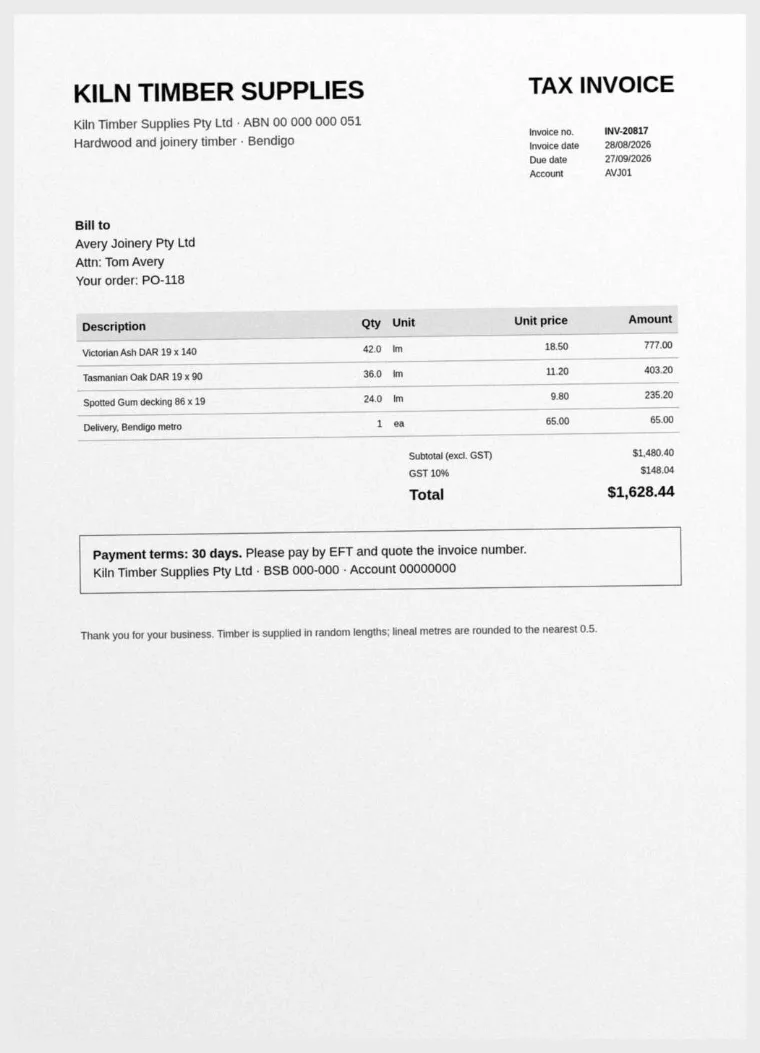
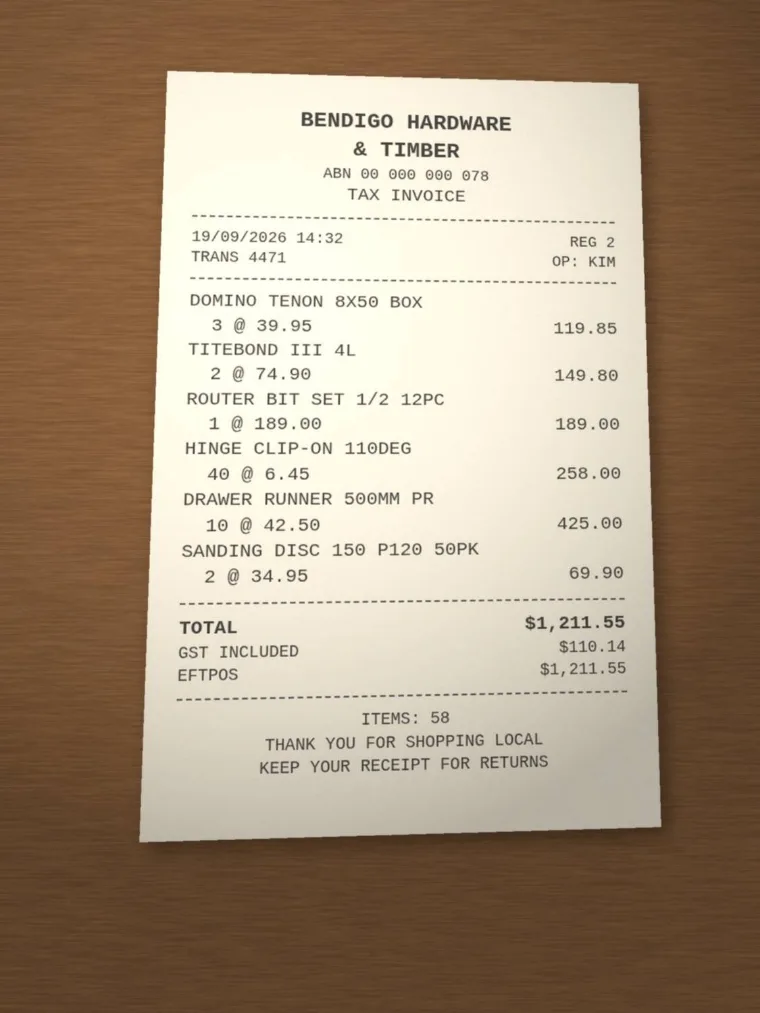
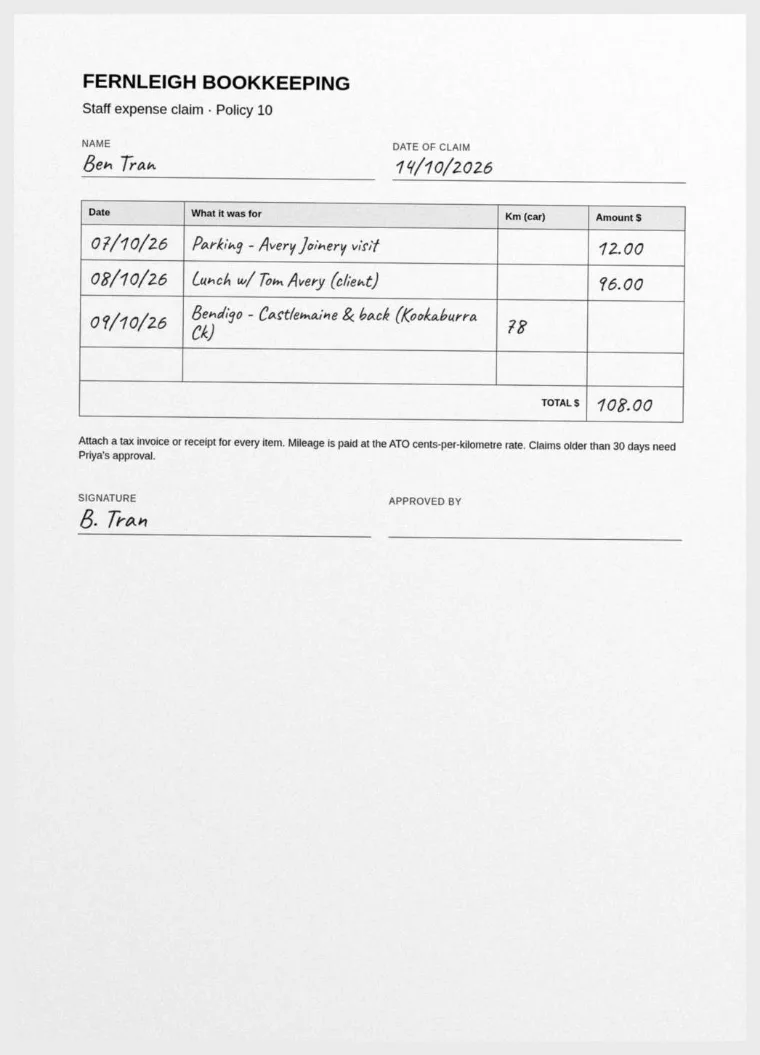
| Document | Tax Invoice |
|---|---|
| From | Kiln Timber Supplies Pty Ltd |
| ABN | 00 000 000 051 |
| Number | INV-20817 |
| Date | 2026-08-28 |
| Due | 2026-09-27 |
| Bill to | Avery Joinery Pty Ltd, Attn: Tom Avery, Your order: PO-118 |
| Before GST | $1,480.40 |
| GST | $148.04 |
| Total | $1,628.44 |
| Payment | EFT · Payment terms: 30 days. Please pay by EFT and quote the invoice number. Kiln Timber Supplies Pty Ltd - BSB 000-000 - Account 000000000 |
| Description | Qty | Unit | Price | Amount |
|---|---|---|---|---|
| Victorian Ash DAR 19 x 140 | 42.0 | lm | $18.50 | $777.00 |
| Tasmanian Oak DAR 19 x 90 | 36.0 | lm | $11.20 | $403.20 |
| Spotted Gum decking 86 x 19 | 24.0 | lm | $9.80 | $235.20 |
| Delivery, Bendigo metro | 1 | ea | $65.00 | $65.00 |
{
  "document_type": "Tax Invoice",
  "issuer": "Kiln Timber Supplies Pty Ltd",
  "issuer_abn": "00 000 000 051",
  "document_number": "INV-20817",
  "date": "2026-08-28",
  "due_date": "2026-09-27",
  "bill_to": "Avery Joinery Pty Ltd, Attn: Tom Avery, Your order: PO-118",
  "line_items": [
    {
      "description": "Victorian Ash DAR 19 x 140",
      "quantity": 42.0,
      "unit": "lm",
      "unit_price": 18.5,
      "amount": 777.0
    },
    {
      "description": "Tasmanian Oak DAR 19 x 90",
      "quantity": 36.0,
      "unit": "lm",
      "unit_price": 11.2,
      "amount": 403.2
    },
    {
      "description": "Spotted Gum decking 86 x 19",
      "quantity": 24.0,
      "unit": "lm",
      "unit_price": 9.8,
      "amount": 235.2
    },
    {
      "description": "Delivery, Bendigo metro",
      "quantity": 1,
      "unit": "ea",
      "unit_price": 65.0,
      "amount": 65.0
    }
  ],
  "subtotal_ex_gst": 1480.4,
  "gst": 148.04,
  "total_inc_gst": 1628.44,
  "payment": {
    "method": "EFT",
    "details": "Payment terms: 30 days. Please pay by EFT and quote the invoice number. Kiln Timber Supplies Pty Ltd - BSB 000-000 - Account 000000000"
  },
  "notes": [
    "Footnote on invoice: 'Timber is supplied in random lengths; linear metres are rounded to the nearest 0.5.'",
    "Account reference printed on invoice: AVJ01 (not captured in a dedicated field).",
    "Verify banking details before payment: BSB 000-000 and Account 000000000 appear to be placeholder/zero values.",
    "Verify ABN: 00 000 000 051 also looks like a placeholder value.",
    "Invoice and due dates are in 2026 (28/08/2026 and 27/09/2026) as printed; confirm these are correct.",
    "Arithmetic check: line items sum to 1480.40, GST 10% is 148.04, total 1628.44 - all consistent with the printed figures."
  ]
}
PT1 · Generated locally · Qwen3.8-27B · 740 tokens · Checked by Next Token: 2 corrections
| Document | TAX INVOICE |
|---|---|
| From | BENDIGO HARDWARE & TIMBER |
| ABN | 00 000 000 078 |
| Number | TRANS 4471 |
| Date | 2026-09-19 |
| Due | — |
| Bill to | — |
| Before GST | $1,101.41 |
| GST | $110.14 |
| Total | $1,211.55 |
| Payment | EFPOS · $1,211.55 |
| Description | Qty | Unit | Price | Amount |
|---|---|---|---|---|
| DOMINO TENON 8X50 BOX | 3 | — | $39.95 | $119.85 |
| TITEBOND III 4L | 2 | — | $74.90 | $149.80 |
| ROUTER BIT SET 1/2 12PC | 1 | — | $189.00 | $189.00 |
| HINGE CLIP-ON 110DEG | 40 | — | $6.45 | $258.00 |
| DRAWER RUNNER 500MM PR | 10 | — | $42.50 | $425.00 |
| SANDING DISC 150 P120 50PK | 2 | — | $34.95 | $69.90 |
{
  "document_type": "TAX INVOICE",
  "issuer": "BENDIGO HARDWARE & TIMBER",
  "issuer_abn": "00 000 000 078",
  "document_number": "TRANS 4471",
  "date": "2026-09-19",
  "due_date": null,
  "bill_to": null,
  "line_items": [
    {
      "description": "DOMINO TENON 8X50 BOX",
      "quantity": 3,
      "unit": null,
      "unit_price": 39.95,
      "amount": 119.85
    },
    {
      "description": "TITEBOND III 4L",
      "quantity": 2,
      "unit": null,
      "unit_price": 74.9,
      "amount": 149.8
    },
    {
      "description": "ROUTER BIT SET 1/2 12PC",
      "quantity": 1,
      "unit": null,
      "unit_price": 189.0,
      "amount": 189.0
    },
    {
      "description": "HINGE CLIP-ON 110DEG",
      "quantity": 40,
      "unit": null,
      "unit_price": 6.45,
      "amount": 258.0
    },
    {
      "description": "DRAWER RUNNER 500MM PR",
      "quantity": 10,
      "unit": null,
      "unit_price": 42.5,
      "amount": 425.0
    },
    {
      "description": "SANDING DISC 150 P120 50PK",
      "quantity": 2,
      "unit": null,
      "unit_price": 34.95,
      "amount": 69.9
    }
  ],
  "subtotal_ex_gst": 1101.41,
  "gst": 110.14,
  "total_inc_gst": 1211.55,
  "payment": {
    "method": "EFPOS",
    "details": "$1,211.55"
  },
  "notes": "No customer / bill-to name printed. Document number is the till transaction reference (TRANS 4471); no separate invoice number is shown. Subtotal ex GST is not printed on the receipt and was calculated as total less GST (1211.55 - 110.14 = 1101.41). No due date present, consistent with point-of-sale payment. ABN is printed as 00 000 000 078 (zeroed pattern) - bookkeeper should verify the supplier's actual ABN before claiming input tax. Operator 'KIM' and 'REG 2' also printed. Item count shown as 58."
}
PT2 · Generated locally · Qwen3.8-27B · 723 tokens · Checked by Next Token: 1 correction
| Claimant | Ben Tran |
|---|---|
| Claim date | 2026-10-14 |
| Total claimed | $108.00 |
| Signed | Yes |
| Approved by | — not yet |
| Date | What it was for | Km | Amount |
|---|---|---|---|
| 2026-10-07 | Parking - Avery Joinery visit | — | $12.00 |
| 2026-10-08 | Lunch w/ Tom Avery (client) | — | $96.00 |
| 2026-10-09 | Bendigo - Castlemaine & back (Kookaburra Ck) | 78 | — |
{
  "claimant": "Ben Tran",
  "claim_date": "2026-10-14",
  "items": [
    {
      "date": "2026-10-07",
      "description": "Parking - Avery Joinery visit",
      "km": null,
      "amount": 12.00
    },
    {
      "date": "2026-10-08",
      "description": "Lunch w/ Tom Avery (client)",
      "km": null,
      "amount": 96.00
    },
    {
      "date": "2026-10-09",
      "description": "Bendigo - Castlemaine & back (Kookaburra Ck)",
      "km": 78,
      "amount": null
    }
  ],
  "total_claimed": 108.00,
  "signed": true,
  "approved_by": null,
  "notes": [
    "The APPROVED BY field is blank. The claim is signed (B. Tran) but has not been approved.",
    "The 09/10/26 item lists 78 km but no amount. The form states mileage is paid at the ATO cents-per-kilometre rate, so this must be worked out before paying. The on-form total of 108.00 only adds the parking (12.00) and lunch (96.00) lines and does not include the mileage.",
    "The form requires a tax invoice or receipt for every item. Receipts are not visible on this scan, so confirm they are attached (in particular for the 96.00 lunch and the parking).",
    "The venue on the 09/10/26 line is handwritten as 'Kookaburra Ck'; confirm the intended name.",
    "Claim date 14/10/2026 is within 30 days of the expense dates (07-09/10/2026), so the older-than-30-days rule (Priya's approval) does not apply on age grounds."
  ]
}
PT3 · Generated locally · Qwen3.8-27B · 510 tokens · Checked by Next Token
01 / The possibilities
A lease, a phone call, a manual, a meeting, a letter. Then the summary, the draft and the answer, written on the machine.
This viewer needs JavaScript. Every source document and output is also on its own page: FINE PRINT, FIRST DRAFT, OPEN FILE, ON THE RECORD and PLAIN ENGLISH.
FINE PRINT / The lease
02 / The control
Rough notes in, a letter out. A dense letter in, plain words out. Your team reads it, fixes it and decides what gets sent.
03 / The search
Twelve policies, indexed on the machine. Ask in plain words; the answer is written only from the passages it finds, and names the policy each point came from.
04 / The office payoff
A letter for the file, an email for the phone, a text for the reminder. Each one written for where it will be read.
Four formats from one twenty-minute call. The notes, the prompts and every output are kept with the demonstration, along with the corrections a person made.
A site meeting, minuted.
Site meeting 7, Peppercorn Street clinic extension. Four speakers, one on the phone.
ON THE RECORD is an original Next Token demonstration. A fictional builder’s site meeting was voiced with Kokoro-82M, transcribed with Whisper and minuted by a local language model, all on our own machines. Speaker names come from context; the transcript has none. Whisper’s voice-activity filter stays off: in an earlier pass it dropped both lines spoken over the phone.
M00 · Voices generated locally with Kokoro-82M · 4 min 14 s
Fictional meeting, written for the demonstration. Voices generated locally; the transcript, minutes and actions come from this recording.
M01 · Transcribed locally · Whisper large-v3 · 680 words
M03 · Generated locally · Qwen3.8-27B · 770 tokens · Checked by Next Token: 3 corrections
One notice, three languages.
IN OTHER WORDS is an original Next Token demonstration. A clinic’s notice about building works, translated for its patients into Vietnamese, Simplified Chinese and Arabic. Next Token read each translation against the English; a fluent speaker should still check any translation before it goes to patients.
TR0 · The notice, in EnglishKookaburra Creek Physiotherapy — We're open during the building works
TR1 · VietnameseKookaburra Creek Physiotherapy — Chúng tôi mở cửa trong thời gian thi công
TR2 · Simplified ChineseKookaburra Creek Physiotherapy — 施工期间照常营业
TR3 · ArabicKookaburra Creek Physiotherapy — ستبقى العيادة مفتوحة أثناء الأعمال الإنشائية
From Monday 19 October, builders will be working on our new rear extension. The clinic stays open as usual: Monday to Friday, 7.30 am to 6 pm, and Saturday, 8 am to 12 pm.
Getting in. Please use the temporary path along the site fence, on the left side of the building. We have laid rubber matting so the path is safe when it rains. If you use a walking frame or a wheelchair, tell reception when you book and we will meet you at the car park.
Noise. There may be building noise between 7 am and 3.30 pm. Ask at reception if you would like earplugs or a quieter room.
Parking. The builders' site office takes the two car spaces nearest the entrance. Free street parking is available on Peppercorn Street.
Your appointments are not affected. We expect to move into the new treatment rooms in February.
Thank you for your patience. If you have any questions, please ask at reception.
Từ thứ Hai, ngày 19 tháng 10, đội thi công sẽ làm việc ở phần mở rộng phía sau mới của chúng tôi. Phòng khám vẫn mở cửa như bình thường: từ thứ Hai đến thứ Sáu, 7 giờ 30 phút sáng đến 6 giờ chiều, và thứ Bảy, 8 giờ sáng đến 12 giờ trưa.
Vào phòng khám. Vui lòng sử dụng lối đi tạm dọc theo hàng rào công trường, ở phía bên trái của tòa nhà. Chúng tôi đã trải thảm cao su để lối đi an toàn khi trời mưa. Nếu quý vị sử dụng khung tập đi hoặc xe lăn, xin vui lòng báo cho lễ tân khi đặt lịch và chúng tôi sẽ đón quý vị tại bãi đỗ xe.
Tiếng ồn. Có thể có tiếng ồn xây dựng từ 7 giờ sáng đến 3 giờ 30 phút chiều. Xin vui lòng hỏi lễ tân nếu quý vị muốn nút tai hoặc phòng yên tĩnh hơn.
Đỗ xe. Văn phòng công trường của đội thi công đang dùng hai chỗ đỗ xe gần lối vào nhất. Có chỗ đỗ xe miễn phí ven đường tại Peppercorn Street.
Các cuộc hẹn của quý vị không bị ảnh hưởng. Chúng tôi dự kiến sẽ chuyển vào các phòng trị liệu mới vào tháng 2.
Cảm ơn quý vị đã kiên nhẫn. Nếu quý vị có bất kỳ câu hỏi nào, xin vui lòng hỏi tại quầy lễ tân.
自10月19日(星期一)起,施工人员将对我们的新建后部扩建部分进行施工。诊所照常营业:星期一至星期五,上午7点30分至下午6点;星期六,上午8点至中午12点。
进入诊所。 请使用沿工地围栏的临时通道,通道在建筑物左侧。我们已铺设橡胶垫,使通道在雨天也安全。如果您使用助行器或轮椅,请在预约时告知前台,我们会在停车场迎接您。
噪音。 上午7点至下午3点30分之间,可能会有施工噪音。如您需要耳塞或较安静的房间,请向前台询问。
停车。 施工方现场办公室占用了离入口最近的两个停车位。Peppercorn Street 有免费路边停车位。
您的预约不受影响。我们预计将于二月搬入新的治疗室。
感谢您的耐心。如有任何问题,请向前台询问。
ابتداءً من الاثنين 19 أكتوبر، سيقوم عمال البناء بالعمل على توسعتنا الخلفية الجديدة. تبقى العيادة مفتوحة كالمعتاد: من الاثنين إلى الجمعة، من 7.30 صباحًا إلى 6 مساءً، ويوم السبت، من 8 صباحًا إلى 12 ظهرًا.
الدخول. يرجى استخدام المسار المؤقت على طول سياج الموقع، على الجانب الأيسر من المبنى. لقد فرشنا سجادة مطاطية حتى يكون المسار آمنًا عند نزول المطر. إذا كنت تستخدم إطار مشي أو كرسي متحرك، يرجى إبلاغ الاستقبال عند الحجز وسنستقبلكم في موقف السيارات.
الضوضاء. قد توجد ضوضاء بناء بين 7 صباحًا و3.30 مساءً. إذا أردتم سدادات أذن أو غرفة أكثر هدوءًا، يرجى السؤال في الاستقبال.
مواقف السيارات. يشغل مكتب المقاولين في الموقع الموقفين الأقربَين إلى المدخل. تتوفر مواقف مجانية على Peppercorn Street.
مواعيدكم غير متأثرة. نتوقع الانتقال إلى غرف العلاج الجديدة في فبراير.
نشكركم على صبركم. إذا كان لديكم أي أسئلة، يرجى السؤال في الاستقبال.
TR1 · Generated locally · Qwen3.8-27B · 320 tokens · Checked by Next Token
TR2 · Generated locally · Qwen3.8-27B · 210 tokens · Checked by Next Token
TR3 · Generated locally · Qwen3.8-27B · 295 tokens · Checked by Next Token: 1 correction
05 / The difference
Cloud assistants are good at being everywhere. A machine in your office is good at being yours. Six differences an office feels in the first month, each with its source.
Where it runs
Drafts, summaries and file searches run on a machine you own, so documents are not sent to another company’s data centre to be processed.
The OAIC says deploying AI “locally or on premises is likely to be more privacy-preserving as it limits the risks of third party access to the data.” Microsoft stores Australian tenants’ Copilot chats in Australia, but says customers outside the EU “may have their queries processed in the US, EU, or other regions”, and now expects in-country processing for Australia by the end of 2026. Checked : OAIC guidance (opens a new tab) · Microsoft Learn (opens a new tab) · Microsoft announcement (opens a new tab).
Client confidentiality
A model on your own machine is not another company your client’s information is passed to, so “where will it be used and stored?” has a one-line answer.
The Tax Practitioners Board, 22 July 2026: practitioners “must obtain permission from each client prior to divulging client information to a third party (which can include entering client information into AI models and tools, depending on how these tools are configured and used)”. Victoria’s Legal Services Board: lawyers “cannot safely enter confidential, sensitive or privileged client information into public AI chatbots/copilots”, and should review the contract terms of commercial tools. This is not legal advice; check your own obligations. Checked : TPB guidance (opens a new tab) · VLSB+C statement (opens a new tab).
No meter, no window
No per-seat allowance, no rolling window and no monthly reset. We size the machine to your office’s workload before quoting.
On Google Workspace Business Standard and Plus, the Gemini app’s Pro model allows “Up to 25 prompts per 4 hours”. On ChatGPT Business, once included usage is used and the workspace has no credits, “the feature is blocked”. Microsoft caps its Copilot Researcher agent at “a maximum of 25 queries per user per month”. Checked : Google Workspace Help (opens a new tab) · OpenAI Help Center (opens a new tab) · Microsoft Learn (opens a new tab).
No one else keeps a copy
Prompts, drafts and meeting transcripts are stored on your machine, under your retention rules, with no vendor log for a vendor’s reviewers or a vendor’s court case to reach.
A 2025 court order in The New York Times’ case against OpenAI covered ChatGPT Team (now Business) conversations until 26 September 2025; Enterprise and Edu were excluded, and OpenAI still holds April to September 2025 data. ChatGPT Business removes deleted conversations within 30 days “unless longer retention is required by law, or is reasonably necessary to protect our services”. Google keeps Workspace Gemini app chats for 18 months by default. Checked : OpenAI on the court order (opens a new tab) · OpenAI enterprise privacy (opens a new tab) · Google Workspace Privacy Hub (opens a new tab).
Continuity
Model files sit on your disk and change only when you choose to update them, so drafts and summaries keep working the way your team approved them.
OpenAI retired GPT-4o, GPT-4.1, o4-mini and GPT-5 from ChatGPT on 13 February 2026, and GPT-5.1 on 11 March 2026. Google folded Gemini into Workspace in January 2025, with Business Standard at about $20 a user (US$14), “only $2 more” than before; Microsoft updated its business suite prices from 1 July 2026. Checked : OpenAI Help Center (opens a new tab) · Google Workspace blog (opens a new tab) · Microsoft Partner Center (opens a new tab).
No search engine in the loop
The model answers from your documents and what it already knows. Nothing is looked up online unless you choose to add web search to your setup.
Unless an administrator sets its policy, Microsoft 365 Copilot can send short web queries to Bing that “may also be informed by data within a Microsoft 365 document”, and Microsoft’s Data Protection Addendum “doesn’t apply” to them. Checked : Microsoft Learn (opens a new tab).
Competitor facts are quoted from the linked pages on the date shown and may change. Microsoft, OpenAI and Google each say their business plans do not train models on your data by default, so training is not one of the six. Speed figures will be published once they are measured on Next Token machines. The calculator is a budget comparison, not a forecast.
Twelve emails, sorted.
SORTED is an original Next Token demonstration. Twelve fictional emails in a practice inbox, each classified, routed to the right person, given a priority and a folder, and tied to the office rule it follows, as data an automation can act on.
SO1 · Generated locally · Qwen3.8-27B · 1066 tokens · Checked by Next Token: 2 corrections
The office inbox, Friday 16 October, 8.10 am
06 / Your next investment
Every busy week needs drafts, summaries and answers. Put repeatable work on your own hardware, give your team room to ask, and keep the cloud tools you still need.
Explore PCs, servers and mini PCsPut your seats in perspective
Three widely used business assistants.
Choose the seats you pay for.
| Assistant | Seat | Seats | Official pricing |
|---|---|---|---|
| Microsoft 365 CopilotAdd-on to Microsoft 365 | Needs a Microsoft 365 business plan underneath, which you keep for email. | Current plans for Microsoft 365 Copilot (opens a new tab) | |
| ChatGPT BusinessAssistant seats | Minimum two seats. Usage limits and credits apply. | Current plans for ChatGPT Business (opens a new tab) | |
| Claude TeamAssistant seats | Minimum two members. Premium seats add usage. | Current plans for Claude Team (opens a new tab) |
Enter a whole number from 0 to 100 for each seat count.
$0.00 / month
$0.00 / year at these monthly rates
Prices checked . Per user with monthly billing, excluding tax. Copilot is Microsoft’s own Australian price; ChatGPT and Claude are US list prices converted to Australian dollars. Annual billing is lower: Copilot Business $31.40, ChatGPT Business Standard $28.80 and Claude Team Standard $28.80 a user a month. Gemini is included in Google Workspace plans rather than sold as a separate seat, so there is nothing separate to count. Check the official plans for current pricing and eligibility.
A few seats can be good value. The case for local grows with repeatable work, shared capacity and control. Compare results and total ownership costs: local workflows use different models.
Your monthly AI budget
Start with the seats above, or set your own monthly spend for the AI tools you use. Explore how much of that budget you could put towards your own local AI setup.
Use the slider for any AI seats, subscriptions or credits you pay for.
Using your selected seats above.
ChatGPT and Claude prices are converted at US$1 = A$1.440. Rate checked 17 October 2026 ↗. Excludes tax and card conversion fees.
$0.00 a year on AI seats
$0.00
spent over 24 months
$0.00 is your budget to compare with a local setup.
Compare that with the complete cost of ownership over 24 months: hardware, installation, electricity, software and support. Only count seats you would actually stop paying for.
Office AI installation from $2,895.75 including GST, plus hardware. This is a budget comparison, not a forecast. Totals use your monthly amount.
07 / Your next capability
Request a demonstration or tell us about the setup you need. We’ll review your request and agree the next step with you.
Your fixed written quote covers the agreed job, with hardware, licences and travel itemised where applicable. Complete-PC prices depend on configuration. Next Token receives payment upfront before ordering hardware and building.
Send your request to Next Token. We’ll review the details and reply by email about the next step.